Ceph-osd verifier
So far, the “reboot” and “shutdown” actions are supported and they both perform the same set of checks.
check Ceph clusters health
check the minimum number of replicas
check availability zones resources
$ juju-verify reboot --unit ceph-osd/0
===[ceph-osd/0]===
Checks:
[OK] check_affected_machines check passed
[OK] ceph-mon/1: Ceph cluster is healthy
[OK] Minimum replica number check passed.
[OK] Availability zone check passed.

Result: OK (All checks passed)
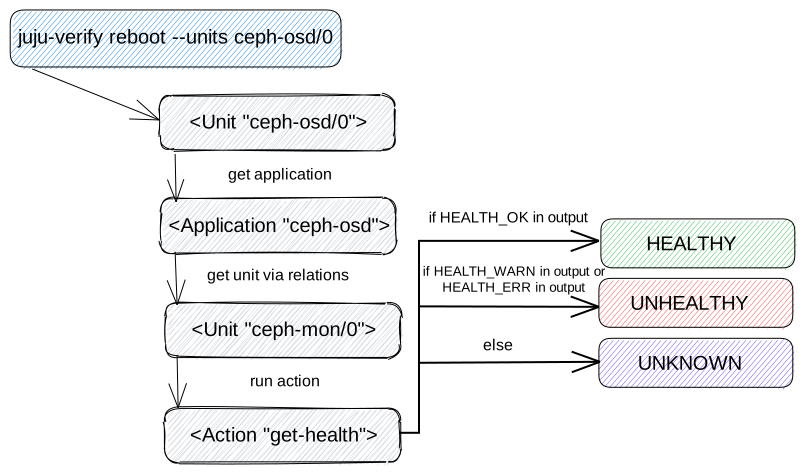
check Ceph cluster health
This check maps ceph-osd applications part of the --units argument and the
first (it doesn’t have to be a leader) ceph-mon unit obtained from the relations.
The get-health action is run on top of obtained ceph-mon unit to determine if
the cluster is healthy.
Note: Units from multiple application can be provided (e.g. ceph-osd-slow/0,
ceph-osd-fast/0), and those could be related to different ceph-mon applications
(e.g. ceph-mon-cluster1, ceph-mon-cluster2). In this case, the get-health
action is run on top of both ceph-mon units (on both clusters).
A cluster is considered healthy if the action’s output contains HEALTH_OK and the
result message look like this:
[OK] ceph-mon/1: Ceph cluster is healthy
On the other hand, the check fails if the output does not contain HEALTH_OK. A Ceph
cluster will be marked as unhealthy if the output contains HEALTH_WARN or
HEALTH_ERR, and in an unknown state if it does not contain any of the above
expressions.
[FAIL] ceph-mon/1: Ceph cluster is in a warning state
  HEALTH_WARN too few PGs per OSD (8 < min 30)
There are several possible reasons why the Ceph cluster is not healthy, but not all of them can be listed here. For more info visit ceph-monitoring.
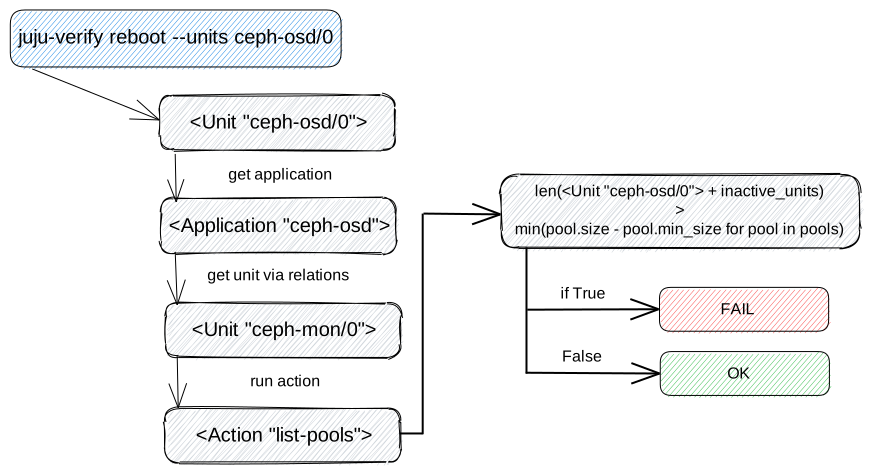
check the minimum number of replicas
While the previous check creates a unique set of “ceph-mon” units from the map, this one goes through each item, calling the “list-pools” action with the “format=json” option to get minimum replication number for each “ceph-mon” unit.
The replication number for each pool is calculated as the pool size minus the minimum pool size. If no group is available, the replication number is returned as None and the check for that application ends successfully.
The next step is to calculate the number of units for each application to be reboot/shutdown, plus the number of units are in an inactive workload status. Such a number is compared to the minimum replication number, and if it’s greater, the check fails.
The successful result message should look like this:
[OK] Minimum replica number check passed.
An unsuccessful result can be caused by two reasons.
Once the units are reboot/shutdown, the minimum cluster size will not be met.
[FAIL] The minimum number of replicas in 'ceph-osd' is 1 and it's not safe to reboot/shutdown 2 units. 0 units are not active.
Currently, some units are in an error state and the minimum cluster size is not met or will not be after reboot/shutdown other units.
[FAIL] The minimum number of replicas in 'ceph-osd' is 1 and it's not safe to reboot/shutdown 1 units. 2 units are not active.
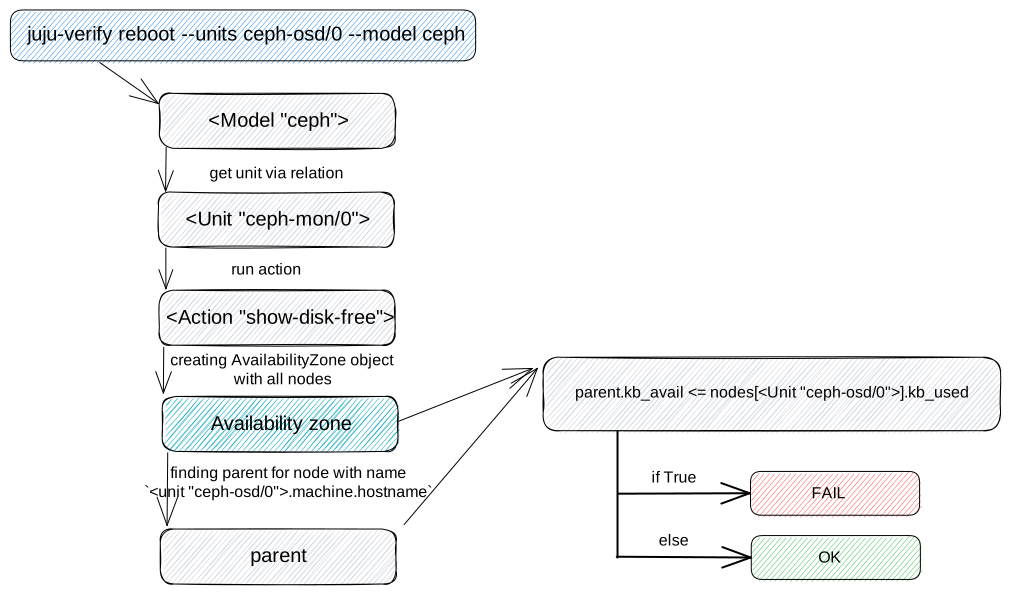
check availability zones resources
This check will obtain a ceph-mon unit in same way as the
check Ceph cluster health. Subsequently, the action show-disk-free is run
on this unit with expected output containing nodes, stray and summary keys.
The key nodes is used to provide information about each node space usage in
the tree form.
Example:
{
  "nodes": [
      {
          "id": -1,
          "name": "default",
          "type": "root",
          "type_id": 10,
          "kb": 4706304,
          "kb_used": 3200640,
          "kb_avail": 1505664,
          ...,
          "children": [
              -7,
              -3,
              -5
          ]
      },
      {
        "id": -5,
        "name": "juju-1234-ceph-0",
        "type": "host",
        "type_id": 1,
        "kb": 1568768,
        "kb_used": 1066880,
        "kb_avail": 501888,
        ...,
        "children": [
            2
        ]
    },
    ...,

  ],
  "stray": [],
  "summary": {
      "total_kb": 4706304,
      "total_kb_used": 3200640,
      "total_kb_used_data": 54720,
      "total_kb_used_omap": 154,
      "total_kb_used_meta": 3145573,
      "total_kb_avail": 1505664,
      "average_utilization": 68.007507,
      "min_var": 1.000000,
      "max_var": 1.000000,
      "dev": 0.000000
  }
}
The availability zone is created based on these nodes, where each node can be described as follows (only the parts used are described):
id- node ID
name- node name
type- Ceph CRUSH Maps type the machine hostname matches the names for the type=host
type_id- Ceph CRUSH Maps type ID used to arrange nodes in a string representation of an availability zone
kb- total space size
kb_used- total used space size
kb_avail- total available (free) space size
children- list of child node IDs
To properly determine whether the unit can be rebooted or shut down, it’s necessary to
compare free space in the parent node minus available space in the child node with the
size of space used in the node. Let’s show this using the previous example of
show-disk-free action output:
verify that the
juju-1234-ceph-0unit can be reboot/shutdownthe unit uses a total of 1066880 kB space
parent with ID -1, which has the unit among its children, has 1505664 kB free space minus 501888 kB available space from child
it’s not safe to reboot/shutdown the unit, because data from it could not be transferred to another unit (1505664 - 501888 < 1066880)
If the availability zone check is successful, the result report looks like this:
[OK] Availability zone check passed.
However, if there is not enough space in the availability zone after reboot/shutdown the unit(s), the resulting message should look something like this.
[FAIL] It's not safe to reboot/shutdown unit(s) ceph-osd/0 in the availability zone '10-default(-1),1-juju-0c0b8f-ceph-0(-5),1-juju-0c0b8f-ceph-1(-3),1-juju-0c0b8f-ceph-2(-7),0-osd.2(2),0-osd.1(1),0-osd.0(0)'.
To view the details, it is necessary to run juju-verify in debug mode, where it will be possible to see the following message.
| DEBUG | Lack of space 358592 kB <= 1385344 kB. Children 1-juju-0c0b8f-ceph-0(-5) cannot be removed.
Where the first number (358592 kB) represents the available space of the parent and the
second number (1385344 kB) represents the used space of all children we check to see if
it is safely to reboot/shutdown. It is also possible to see the full output of
show-disk-free action.
| DEBUG | parse information about disk utilization:
{"nodes":[{"id":-1,"name":"default","type":"root","type_id":10,"reweight":-1.000000,"kb":3137536,"kb_used":2778944,"kb_used_data":41344,"kb_used_omap":308,"kb_used_meta":2737162,"kb_avail":358592,"utilization":0.000000,"var":0.000000,"pgs":0,"children":[-7,-3,-5]},{"id":-5,"name":"juju-0c0b8f-ceph-0","type":"host","type_id":1,"pool_weights":{},"reweight":-1.000000,"kb":1568768,"kb_used":1385344,"kb_used_data":20672,"kb_used_omap":154,"kb_used_meta":1364453,"kb_avail":183424,"utilization":88.307768,"var":0.997029,"pgs":0,"children":[2]},{"id":2,"device_class":"hdd","name":"osd.2","type":"osd","type_id":0,"crush_weight":0.001495,"depth":2,"pool_weights":{},"reweight":1.000000,"kb":1568768,"kb_used":1385344,"kb_used_data":20672,"kb_used_omap":154,"kb_used_meta":1364453,"kb_avail":183424,"utilization":88.307768,"var":0.997029,"pgs":8},{"id":-3,"name":"juju-0c0b8f-ceph-1","type":"host","type_id":1,"pool_weights":{},"reweight":-1.000000,"kb":0,"kb_used":0,"kb_used_data":0,"kb_used_omap":0,"kb_used_meta":0,"kb_avail":0,"utilization":0.000000,"var":0.000000,"pgs":0,"children":[1]},{"id":1,"device_class":"hdd","name":"osd.1","type":"osd","type_id":0,"crush_weight":0.001495,"depth":2,"pool_weights":{},"reweight":0.000000,"kb":0,"kb_used":0,"kb_used_data":0,"kb_used_omap":0,"kb_used_meta":0,"kb_avail":0,"utilization":0.000000,"var":0.000000,"pgs":0},{"id":-7,"name":"juju-0c0b8f-ceph-2","type":"host","type_id":1,"pool_weights":{},"reweight":-1.000000,"kb":1568768,"kb_used":1393600,"kb_used_data":20672,"kb_used_omap":154,"kb_used_meta":1372709,"kb_avail":175168,"utilization":88.834040,"var":1.002971,"pgs":0,"children":[0]},{"id":0,"device_class":"hdd","name":"osd.0","type":"osd","type_id":0,"crush_weight":0.001495,"depth":2,"pool_weights":{},"reweight":1.000000,"kb":1568768,"kb_used":1393600,"kb_used_data":20672,"kb_used_omap":154,"kb_used_meta":1372709,"kb_avail":175168,"utilization":88.834040,"var":1.002971,"pgs":8}],"stray":[],"summary":{"total_kb":3137536,"total_kb_used":2778944,"total_kb_used_data":41344,"total_kb_used_omap":308,"total_kb_used_meta":2737162,"total_kb_avail":358592,"average_utilization":88.570904,"min_var":0.997029,"max_var":1.002971,"dev":0.263136}}